The aim of this project is to help in building an 'operator' based on Picroft, that is, a home assistant that values privacy so much that it cannot listen when you don't want them to. This can be done as simply as wiring in a button which only allows the home assistant to listen when the button is pressed. However, for Aesthetic purposes, it is better to retrofit the Pi to an old telephone, intercom system or radio. This way you can use the inbuilt mic and speaker from the device, and your home assistant will look like a normal part of your home.
This project uses Mycroft.ai - or more specifically their open-source Raspberry Pi version Picroft - to provide the home assistant part of this. Mycroft.ai is an open-source home assistant, and while they focus heavily on privacy and promise to "ever sell your data or give you advertisements on our technology" the aim of this git is to hack the Picroft system to enforce that policy and so create a home-assistant that only listens when you allow it to.
There are two parts to the build, the software and the hardware. The hardware part will obviously be different depending on the device you are retrofitting your Picroft into, but the basic idea is the same. The use of relays to allow access to the speaker and mic is optional - the oPirator Skill does already include commands to mute Mycroft's mic, but it may provide more peace of mind for those more security concerned.
Software
-
Firstly, download, flash and install Picroft on your Raspberry Pi according to the instructions.
- Setting up the mic and audio is handled automatically by Picroft's setup wizard, so follow those instructions carefully. Make sure you select the correct options for however you have connected the speaker and microphone from the telephone.
-
It might be necessary to follow these instructions and delete these lines in
/etc/mycroft/mycroft.confif your audio / mic does not work. This happened with my first install, the only sound I was getting was some white noise which increased in volume as I turned up the volume in Mycroft.
-
The next step is activating the skill which allows Mycroft to be activated by just picking up the handset:
- You may need to allow Mycroft accesses to the GPIO pins via:
sudo usermod -g gpio mycroft
- Then need to navigate into the Mycroft Core from the command line via:
cd mycroft-core
- Finally, use Mycroft's inbuilt skill's manager to download this git and install it:
mycroft-msm install https://github.com/4r3st3r/operatorPi
(Hopefully this skill will soon be included within the Mycroft Skill Store, so it may be made as simple as asking Mycroft to install the Operator Skill)
Then you are all done! When you pick up the receiver you should simply be able to ask Mycroft a question - without the need to say "Hey Mycroft". When you put the receiver down, Mycroft will immediately stop whatever he is doing, and the mic will be muted.
Hardware
-
First step is to get the phone, intercom, radio or other old device that you plan to convert to a home-assistant, and remove all of the bits you will no longer need.
- This will obviously be different depending on the device, and on how much of it you want to keep "stock", you may find it easier to just replace all of the internal components with new parts. This will allow you to capitalise on any improvements in technology (e.g. louder / clearer sound) whilst still retaining the look or aesthetic you are after.
-
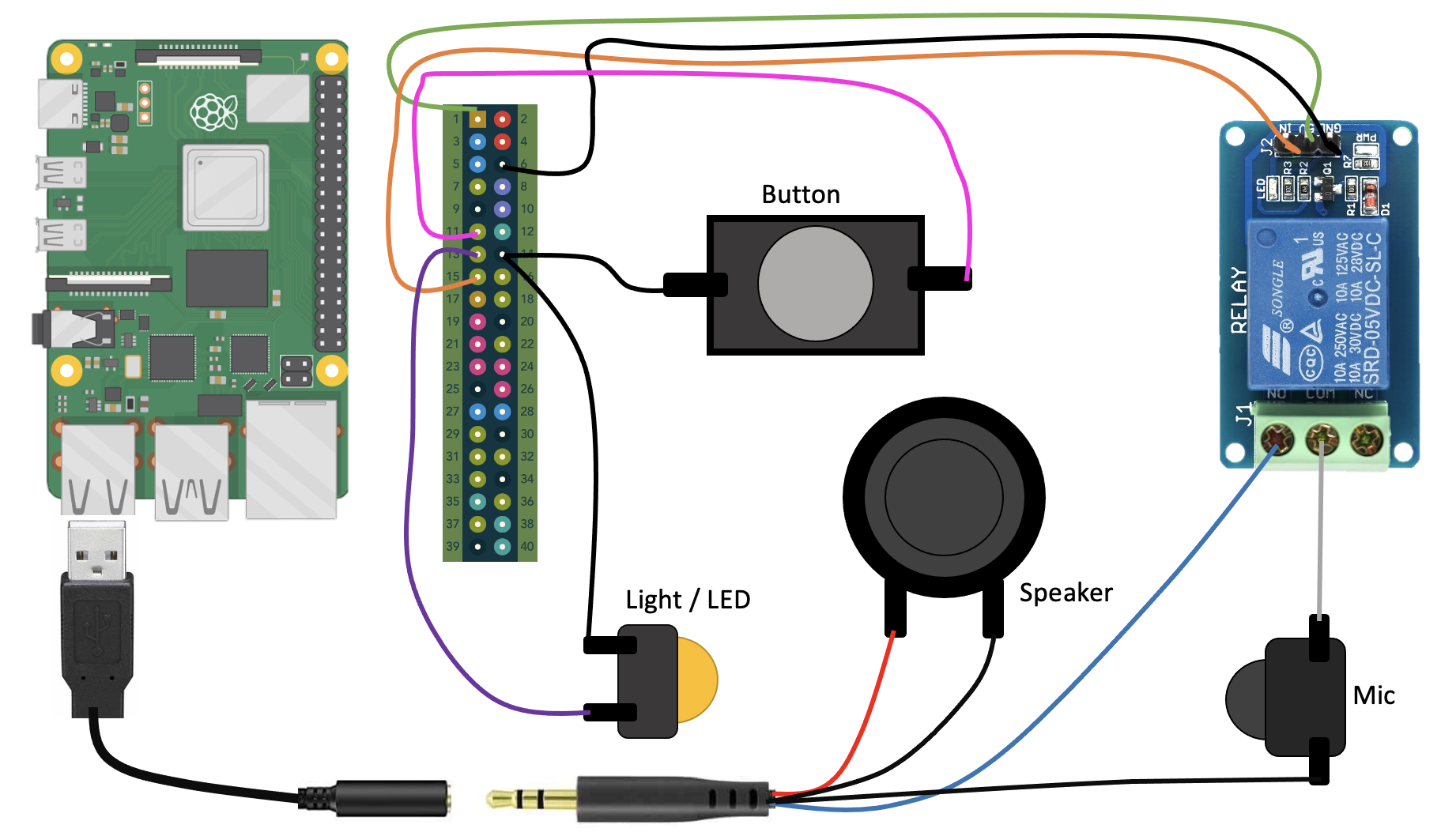
The most important part of this is to ensure that whatever button or switch is activating and deactivating Mycroft is wired correctly. The code in this git is set up to activate when the button-circuit is open (i.e. the button is not being pressed), and deactivate it when closed (i.e. when the button is being pressed).
-
The relay is used to ensure Mycroft cannot listen, until it is activated, but physically disconnecting the microphone wire from the output. Those less privacy-concerned do not have to include the relay, the skill itself gives instructions to mute the mic, however Mycroft will still listen for the activation phrase.
- It is important to ensure that the microphone is connected to the NO (normally open) side of the relay. This way it will activate when the phone is picked up, and deactivate when it is put down.
Circuit Diagram
- TODO: Allow for a relay to be used to switch the speaker when the phone is on the hook. This will allow for a 'loudspeaker' to be used when the phone is down for alarms etc., but this will not allow the Mycroft to listen unless the phone is picked up.